StressWatch vs Cortisol+: Apple Watch stress apps compared
StressWatch shows real-time stress from heart rate and HRV. Cortisol+ combines HRV, sleep and recovery into a documented wellness score. Compare inputs, limits and fit.
Published October 20, 2026 · By Cortisol+ Editorial
Should you use StressWatch or Cortisol+?
Choose StressWatch if you want frequent stress readings on your wrist. Choose Cortisol+ if you want one daily score that combines HRV, sleep and recovery, with the weights published. Both read Apple Health data from an Apple Watch. Neither measures cortisol.
Disclosure: Cortisol+ publishes this guide. We compared StressWatch’s App Store listing and help documentation, checked October 20, 2026, with our own published methodology. We have not run a hands-on or clinical accuracy comparison of the two apps.
How each app builds its number
StressWatch’s FAQ says its real-time stress level is based on recent heart rate and HRV, and updates roughly every six minutes. It displays HRV as RMSSD, while Apple Health’s HRV field uses SDNN, so its HRV numbers can differ from Apple Health. The developer says readings personalise after about 30 days of heart-rate data.
Cortisol+ calculates a 0–100 wellness score from up to ten Apple Health inputs. HRV and sleep carry 20% each and resting heart rate 18%; breathing rate, activity, blood oxygen and other factors make up the rest. The methodology page lists every weight, how the baseline builds over your first 28 readings, and how missing data is handled.
| Question | StressWatch | Cortisol+ |
|---|---|---|
| Main view | Real-time stress level through the day, plus trends | A daily wellness score with HRV, sleep and recovery breakdowns |
| Documented inputs | Heart rate and HRV from Apple Health | HRV, sleep, resting heart rate, breathing rate, activity and five smaller factors |
| Published weights | Inputs explained in an FAQ; no formula published | Every input weight published |
| Learning period | About 30 days of heart-rate data | Blending starts after 10 readings; fully personal at 28 |
| Watch presentation | Watch app and watch-face complications | Watch app; most analysis on iPhone |
| Measures cortisol? | No | No; the name describes the topic, not a hormone sensor |
Where StressWatch is strong
StressWatch has a large rating base on the US App Store (4.7 from more than 24,000 ratings on October 20, 2026). Apple has featured it in its editorial collections, and its complications put a stress reading one glance away. Its documentation is candid. It says the app tracks physical stress, “cannot monitor emotional or cognitive stress”, and that HRV is not the same as mental stress. It also lists when readings pause: during workouts, in Low Power Mode, or when the watch is loose.
If what you want is a frequent, glanceable signal through the day, StressWatch is designed around that.
Where Cortisol+ differs
Cortisol+ is built around a slower question: how sleep, HRV and recovery fit together from day to day. Instead of a stream of moment-to-moment readings, you get one score and the factors that moved it, with the weighting visible.
That openness is a way to check the assumptions. It doesn’t prove the score is more accurate. A different formula reading the same Watch data will produce a different number, and that difference alone doesn’t show which app is right.
Cost and trials
Both apps are free to download and put their analysis behind a subscription. Prices and trial terms vary by account and change over time, so check the offer shown in each app before subscribing. Cortisol+ analysis requires a subscription or an eligible trial.
How to compare them yourself
- Wear the same Watch with your usual routine for a week, and allow both apps Health access.
- Compare like with like. A StressWatch reading at 3 p.m. isn’t the same thing as a Cortisol+ score for the whole day.
- When either app shows a surprising value, open Apple Health and check that day’s HRV and sleep samples.
- Note which explanation actually helps you change something, such as bedtime, training load or caffeine timing. Our stress and sleep journal is a free place to record it.
- Decide based on usefulness and price. A week of comparing screens can’t establish hormone accuracy.
Related comparisons
See all five apps side by side in our Apple Watch stress app comparison, or read Welltory vs Cortisol+, Bevel vs Cortisol+ and Athlytic vs Cortisol+. For what the Watch can and can’t tell you about hormones, read can Apple Watch measure cortisol?.
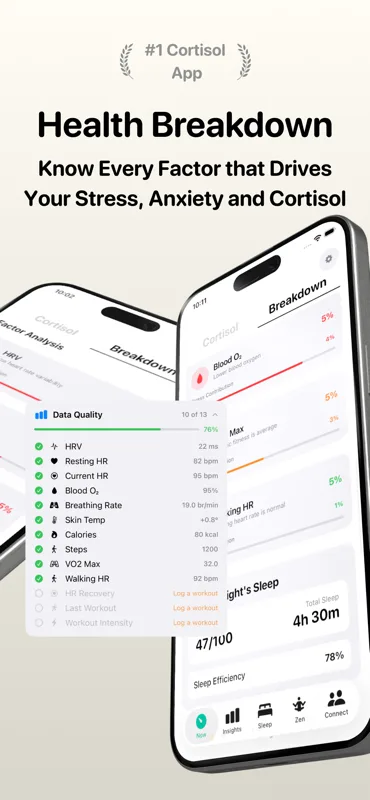
Product screenshot with example readings. Your available inputs depend on Health permissions and recorded data.
View Cortisol+ on the App Store. Free to download; analysis requires a subscription or eligible trial.