Welltory vs Cortisol+: Apple Watch stress tracking compared
Welltory also supports Apple Watch. Compare its documented HRV approach with Cortisol+, including score limitations, subscription questions and product fit.
Updated September 16, 2026 · By Cortisol+ Editorial
Is Cortisol+ a Welltory alternative for Apple Watch?
Yes. Cortisol+ is an option if you want to review Apple Health HRV and sleep data alongside an explained wellness score. Welltory also supports Apple Watch and uses recorded beat intervals for HRV analysis. Compare how each app explains your data, the views you need and your current subscription offer. Neither Watch workflow measures cortisol directly.
Explore Cortisol+ on the App Store or watch the interface walkthrough. Cortisol+ analysis requires a subscription or eligible trial.
What changed in this comparison
Welltory supports Apple Watch; it is not just a phone-camera app. Our earlier comparison described it too narrowly and made unsupported claims about comparative accuracy, pricing and cortisol tracking. This revision corrects those claims.
Disclosure: Cortisol+ publishes this guide. It is a comparison of official documentation and our own product implementation, with Welltory’s Apple Watch documentation rechecked September 16, 2026. We have not conducted a hands-on or clinical accuracy comparison of the two apps.
The main difference to evaluate
Welltory’s Apple Watch documentation explains its Apple Health connection and use of recorded beat intervals for HRV analysis. It supports a Watch-based workflow as well as other measurement methods.
Cortisol+ combines available wearable inputs into a 0–100 wellness score, with views for HRV, sleep and recovery. Its score uses model assumptions and is not a measured hormone level. The methodology lists inputs, weights, baseline rules and limitations.
| Question | Welltory | Cortisol+ |
|---|---|---|
| Apple Watch support | Documented Apple Watch and Apple Health connection | Reads permitted Apple Health data from a compatible Watch |
| Main interpretation | HRV-based stress and energy analysis, with other health features | A weighted wellness score plus biometric and recovery views |
| Underlying formula | See Welltory’s method documentation | See our published input weights and baseline description |
| Current price | Check the offer available to your account | Free download; analysis requires a subscription or eligible trial |
| Is it a cortisol test? | Its Watch HRV workflow is not a hormone test | No; clinical accuracy against cortisol testing has not been established |
How to choose without overreading the score
Use the same practical questions for both apps. Can you see when data was recorded? What happens when a night of sleep is missing? How much history is needed before the baseline is useful? Does the presentation help you understand a routine, or suggest medical certainty it cannot supply?
An accuracy claim about measuring heartbeats is different from an accuracy claim about interpreting stress. Neither proves that a model can infer an individual’s cortisol concentration. We do not rank either app as more accurate for cortisol.
Subscriptions and privacy
Check current plan details inside each app, including trial eligibility, renewal period and cancellation terms. Our previous price ranges and claims that basic Cortisol+ analysis is free were not a reliable account of current offers.
Cortisol+‘s core scoring runs on-device, but optional connected services, account and coaching features have separate data flows. Read our privacy policy. For Welltory, review its current privacy guidance and the permissions requested during setup rather than assuming every feature shares the same processing model.
A practical starting point
If you already use an Apple Watch, examine each app’s actual explanation and subscription offer before choosing. You can also start with the readings available in Apple Health and our free stress and sleep journal.
See the broader Apple Watch stress-app comparison and what Apple Watch can tell you about cortisol. Neither an app score nor this comparison should determine medical testing or treatment.
Looking for a Welltory alternative for Apple Watch?
Start with the reason you want to change apps. If you only need to inspect recorded HRV values, check the data already available in Apple Health before buying another subscription. If you want those readings presented alongside sleep and activity, compare the actual dashboards and explanations in each app.
Cortisol+ is one option for that second use case. Its published methodology lets you inspect the assumptions behind its wellness score. This is a reason to evaluate the product, not evidence that it is more accurate than Welltory. Welltory already documents an Apple Watch workflow, so switching does not create a new hormone sensor or improve the Watch hardware.
| Your priority | What to evaluate |
|---|---|
| See the original readings | Check Apple Health timestamps and sources first |
| Understand the summary | Read each app’s explanation of inputs, baseline and missing data |
| Review overnight patterns | Check whether the display covers sleeping samples or a whole-day summary |
| Avoid an unwanted renewal | Read the exact trial and subscription terms before accepting |
| Explore more than two products | Use our wider Watch-app comparison |
A practical comparison checklist
Before comparing scores, open the same period in each app. Record which device supplied the data, which HRV metric is shown, how many readings are available and whether sleep data has synced. A different interpretation of the same readings does not prove one product is wrong.
Use our overnight HRV checklist if you are investigating a low night. To learn whether either app can answer a hormone question, read can Apple Watch measure cortisol?.
View Cortisol+ on the App Store. Analysis requires a subscription or eligible trial. Check the current offer in the app; this guide does not promise a price or a free analysis tier.
What does the Cortisol+ dashboard show?
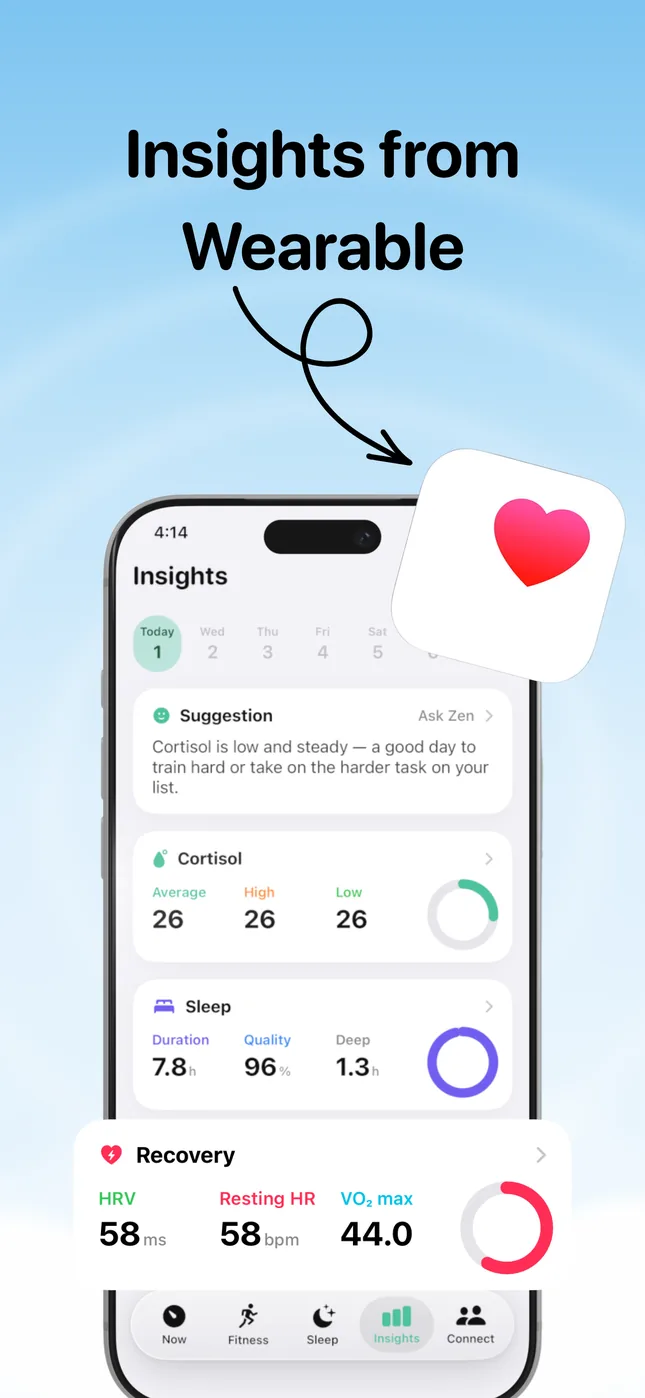
Product screenshot with example readings. Your available inputs depend on Health permissions and recorded data.
The breakdown helps you look beyond one number to the signals used by the app. Start with our published scoring methodology, then compare the same period in Apple Health. This makes the assumptions reviewable; it does not establish clinical validity.
How to compare the apps over a week
- Pick a question, such as whether you can easily review sleep alongside HRV.
- Use the same Watch and keep your usual wear routine. Do not compare one app’s overnight summary with another app’s single daytime sample.
- Check the original Apple Health dates and sources when either app shows missing or unexpected data.
- Write down which explanation helps you and which features require payment. The free observation journal can hold your notes.
- Decide based on usability, permissions and the subscription offer. A week of comparing screens cannot establish hormone accuracy or prove a health improvement.